
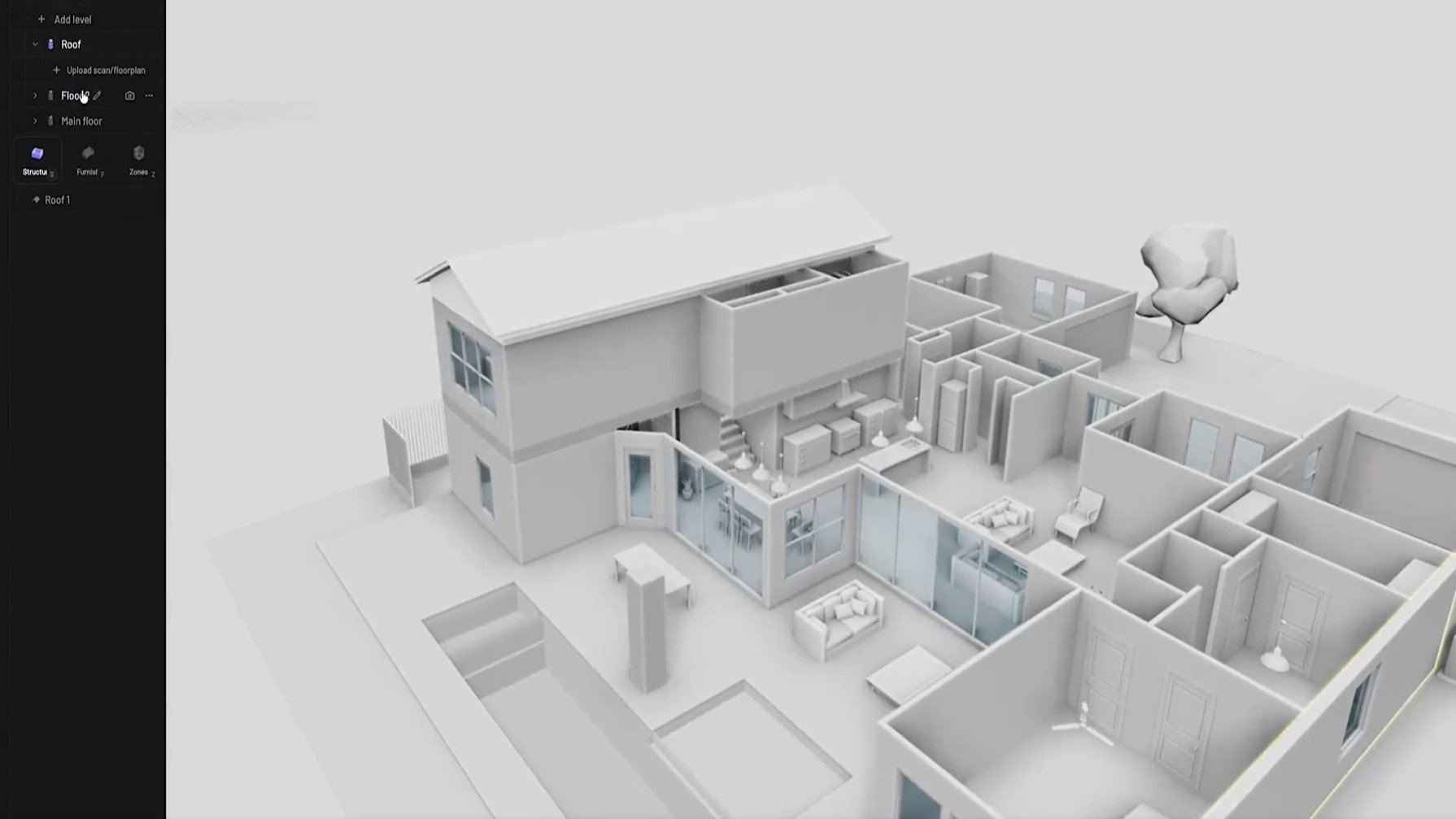

The Pascal Editor team released a fully functional 3D building and room design tool that operates 100 percent in the browser. No downloads, no licences, no Revit or AutoCAD required. The site at editor.pascal.app loads instantly and delivers real-time editing powered by React Three Fiber and WebGPU, rendering directly on the device graphics processor.
Engineering students in Kenya will recognise the familiar frustration it solves. Late nights in a JKUAT or University of Nairobi lab waiting for a shared Revit seat, or watching a cracked copy crash halfway through an assignment, are common experiences. Open Pascal Editor on any laptop or even a phone browser, and the workspace appears immediately. The difference feels immediate because the tool skips every barrier that usually eats the first half hour of a design session.
Start with the basic structure. Conventional CAD demands choosing a template, setting project units, and building a browser tree from scratch. Pascal Editor presents a ready hierarchy: site, building, then levels stacked at real heights. Add a new floor with one click, and the 3D view shifts automatically. Students who have spent lectures learning Revit level constraints will notice the time saved here is measurable.
Wall placement follows the same direct approach. Drag a wall in 3D space or trace it on the floor plan overlay. Thickness and openings update live through Boolean calculations handled locally. In AutoCAD or Revit, the same task usually means drawing 2D lines first, extruding them, then fixing intersections manually across multiple views. The browser version keeps everything visible and editable in one place, cutting the cycle of switching tabs or regenerating the model.
Slabs, roofs, and zones work on simple polygon outlines. Draw the boundary and the geometry forms without extra property panels or error-checking routines. Rooms appear as colour-coded zones that snap to surrounding walls. Traditional BIM software requires room separation lines, tag placement, and repeated validation runs that often fail when walls move. Here, the zones stay consistent because the calculations happen in real time inside the browser tab.
Furniture and fixtures slot in with built-in collision detection. Doors and windows sit at correct elevations, and the editor prevents overlaps. Populate a living room or kitchen in minutes using the item library. Desktop programs typically force users to import external families or blocks, a step that introduces file-size bloat and version conflicts. Pascal Editor keeps the model lightweight and self-contained.
Navigation tools match the workflow needs. Stack levels in position, explode the building apart for inspection, or isolate one floor. A 50-step undo history persists even if the browser closes, saved automatically to local storage. Students juggling multiple assignments will appreciate not losing progress when the campus Wi-Fi drops. Conventional software often ties history to a single project file that can corrupt or demand constant manual saves.
The entire process suits early-stage work that dominates student projects and small-office concept phases. A full two-storey house with rooms and basic furniture can take shape in under an hour. Later, export the model for detailed structural analysis or county submission packages that still require licensed BIM platforms. The tool does not replace final documentation but removes the upfront cost and hardware demands that usually limit practice.
GitHub shows more than 10,000 stars since launch, with the MIT licence allowing anyone to fork or adapt the code. Recent updates improved selection feedback and support for rotated elements. The development remains open for contributions, which keeps the feature set growing without corporate gatekeeping.
For workplaces in Kenya, the savings are straightforward. Annual subscriptions for a single Revit seat can exceed the monthly salary of a junior engineer. Small consultancies gain the ability to produce quick 3D proposals for clients without allocating budget to software. Students graduate already comfortable with the interface, shortening the onboarding period once they join a firm.
The editor focuses on architectural massing, spatial arrangement, and interior layout rather than full MEP coordination or load calculations. That boundary is clear and acknowledged by the developers. Yet for the conceptual stages that consume most time in education and early practice, the practicality stands out. No more waiting for lab access, no more licence expiry warnings, and no more heavy files that slow older laptops.
Just open the tab, start with a simple brief, and refine the plan. The model stays in the browser until you choose to share the link or export. For engineering students balancing coursework, part-time site visits, and limited resources, Pascal Editor turns an expensive professional workflow into an everyday study tool.
NB: Terms and conditions apply. Article not sponsored.
Comments (0)
Leave a Comment
No comments yet. Be the first to share your thoughts!